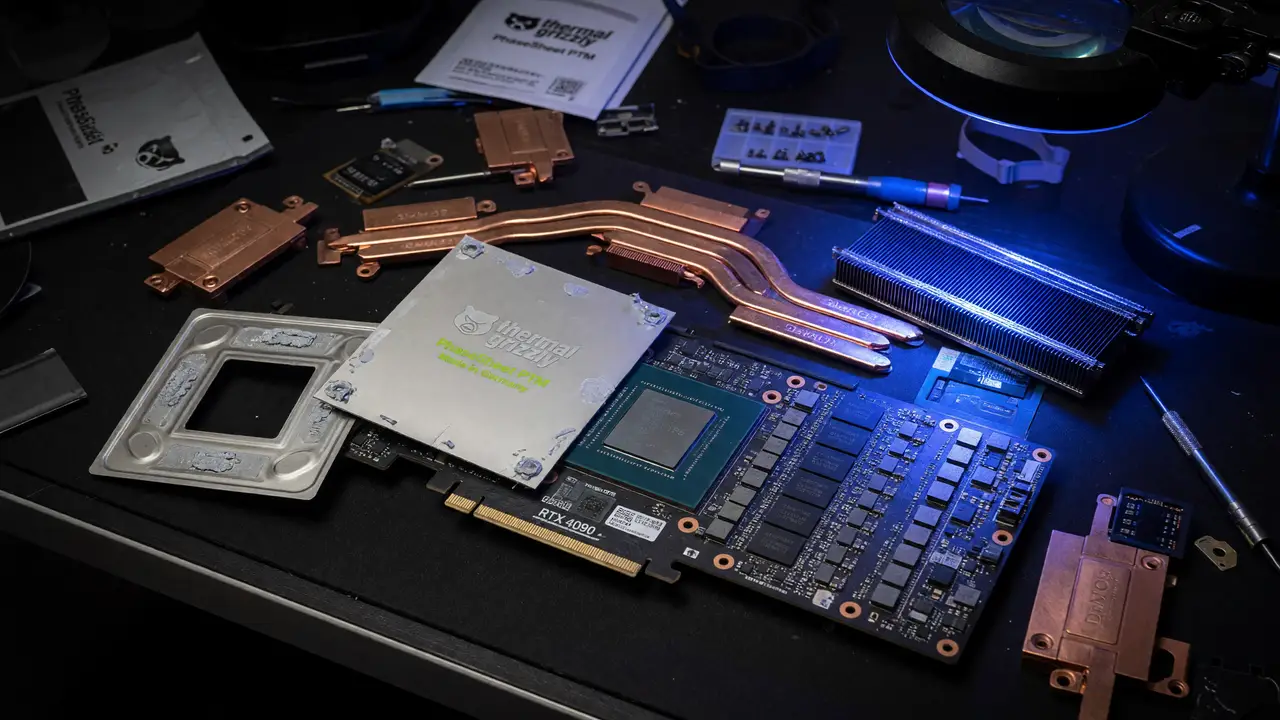
Fixing Thermal Crashes on the RTX 4090: Review of the Thermal Grizzly PhaseSheet PTM
Review of the Thermal Grizzly PhaseSheet PTM phase-change pad and how it resolves RTX 4090 thermal crashes, black screens, and hotspot issues on high-TDP cards.
Plenty of RTX 4090 owners deal with sudden black screens, driver resets, and hard shutdowns once core temps push past 80 °C. The factory paste tends to break down within a couple of years, hardening into a crust that creates hotspots well above 100 °C. Thermal Grizzly’s PhaseSheet PTM uses a phase-change pad that avoids pump-out while maintaining solid contact on these high-TDP dies.
Why the 4090 Develops Thermal Problems
These cards pull around 450 W under load. Over time the stock paste migrates away from the center of the die, and the VRAM pads can fold or compress unevenly. Crashes sometimes appear at core readings as low as 58 °C, while hotspots reach 94–110 °C on cards that are only two or three years old. The issue shows up on MSI Suprim X, ASUS ROG Strix, Gigabyte Gaming OC, and Inno3D boards alike.
When failures track with temperature rather than voltage or clocks, the thermal interface is the clear culprit. A fresh application of conventional paste buys some time, but the same migration problem usually returns.
PhaseSheet PTM Specifications and Behavior
The PhaseSheet PTM is a 0.2 mm gray pad that stays solid at room temperature and softens above 45 °C. Once it melts it fills the tiny gaps the way paste does, yet it holds up far better across repeated heat cycles.
Key specifications
| Property | Value |
|---|---|
| Dimensions | 50 × 40 mm (cuttable) |
| Nominal thickness | 0.2 mm (225 µm unmelted) |
| Minimum bond line | ~22 µm after burn-in |
| Thermal conductivity | >6.5 W/m·K at 22 µm |
| Phase transition | 45–55 °C primary range |
| Operating range | −75 °C to 150 °C |
| Electrical conductivity | None |
It takes roughly ten thermal cycles above 60 °C to reach full performance. The pad comes pre-sized for GPU dies and includes clear notes for naked-die 4090 and 4080 cards.
Installation Workflow
A careful install avoids the usual mistakes that lead to poor contact.
- Clean the die and cold plate with isopropyl alcohol until every trace of old material is gone.
- Cut the pad to the die shape with a 1–2 mm margin all around.
- Lay it centered on the die without stretching or folding.
- Reassemble using the stock torque sequence and mounting pressure.
- Run ten stress-test cycles (FurMark or 3DMark) to finish the burn-in.
After the tenth cycle the interface reaches its lowest thermal resistance of 0.04801 W/K.
flowchart TD
    A[Clean die & cold plate with IPA] --> B[Cut PhaseSheet to die shape<br/>1-2 mm margin]
    B --> C[Center pad on die<br/>no folds or stretch]
    C --> D[Reassemble with stock torque sequence]
    D --> E[Run 10 stress-test cycles<br/>FurMark or 3DMark]
    E --> F[Burn-in complete<br/>Lowest thermal resistance]
To watch temperatures during burn-in, open a terminal and run:
nvidia-smi -l 2 --query-gpu=temperature.gpu,temperature.memory --format=csvMeasured Temperature Reductions
Independent tests and owner reports show steady gains once burn-in is complete.
RTX 4090 temperature comparison (450 W load)
| Interface | Core (°C) | Hotspot (°C) | Notes |
|---|---|---|---|
| Degraded factory paste | 80–91 | 94–110 | Frequent crashes |
| Honeywell PTM7950 | 42.3 | ~55 | Long track record |
| Thermal Grizzly PhaseSheet | 42.0 | ~53 | Slight edge in direct test |
| Post-repaste user reports | −12 to −13 | −20 to −32 | ROG Strix OC 4090 data |
Sustained clocks often climb another 100 MHz, and power limits can rise about 70 W before throttling kicks in. VRAM temps sometimes increase 6–10 °C because of changed pressure; keep an eye on them with HWInfo during long sessions.
How It Compares to Alternatives
Phase-change pads give up a little peak performance for much better longevity. Pastes like Kryonaut can run 2–3 °C cooler on day one, but they start to degrade within 12–18 months on 400 W+ GPUs. Graphene sheets such as the KryoSheet demand extra care since they conduct electricity. Budget PTM clones from Thermalright come close to PTM7950 numbers at lower cost, though they lack the same published longevity data.
The PhaseSheet lands in the middle: it matches or edges out Honeywell PTM7950 in direct comparisons, stays non-conductive, and stays simple to apply.
Practical Takeaways for 4090 Owners
- Use the PhaseSheet on cards already showing temperature-related instability rather than as preventive maintenance on new hardware.
- Budget $14–17 per pad; one sheet handles a single GPU.
- Expect real improvement only after the tenth thermal cycle—log temperatures before and after.
- If VRAM temperatures rise after install, double-check pad alignment and mounting pressure before assuming a defect.
The Thermal Grizzly PhaseSheet PTM fixes the thermal-interface problem that causes most RTX 4090 crashes. For owners who don’t want to repaste every 12–18 months, it offers a durable, set-and-forget option that keeps delta-T values low across years of heavy use.